MacBook Buying Guide 2026: Neo vs Air vs Pro – Which One Should You Buy?
MacBook Buying Guide 2026: Neo vs Air vs Pro – Which One Should You Buy?

macbook new air pro
Apple’s 2026 MacBook lineup introduces a clearer segmentation than ever before, making it easier—but still critical—to choose the right device based on your workflow and budget. The lineup now consists of three primary tiers: MacBook Neo, MacBook Air, and MacBook Pro. Each category targets a different type of user, from casual consumers to high-performance professionals.
This guide breaks down each model in detail so you can make a well-informed decision.
MacBook Neo: The Budget King for Everyday Use

The MacBook Neo is Apple’s most affordable laptop to date, starting at just $599 (or $499 for students). It is designed for users who need a reliable machine for basic computing without overspending.
Performance and Hardware
Powered by the A18 Pro chip and equipped with 8GB RAM, the Neo is optimized for efficiency rather than raw power. While it won’t handle heavy workloads like video editing or 3D rendering, it performs smoothly for:
- Web browsing
- Document editing
- Streaming and media consumption
- Online classes and meetings
For its price range, the performance is surprisingly stable and responsive.
Design and Build Quality
Despite being budget-friendly, the MacBook Neo maintains Apple’s premium build standards. It comes in fresh color options like blush, indigo, citrus, and silver, making it visually appealing—especially for students and younger users.
Trade-offs to Consider
To achieve its low price point, Apple has removed some premium features:
- No backlit keyboard
- No advanced haptic trackpad
- Limited port selection (2x USB-C)
- Standard 60Hz display
- Touch ID only available via upgrade
These compromises are noticeable but acceptable given the pricing.
Who Should Buy It?
The MacBook Neo is ideal for:
- Students
- Casual users
- Families needing a shared device
- Budget-conscious buyers
If your usage is lightweight, this is easily the best value MacBook in 2026.
MacBook Air: The Perfect Balance
Positioned in the middle, the MacBook Air remains Apple’s most versatile and widely used laptop. It strikes a balance between performance, portability, and price.

Performance Upgrade
The Air is powered by the new M5 chip, paired with 16GB RAM and 512GB storage as standard. This is a significant leap over the Neo and makes it capable of handling:
- Multitasking with multiple apps
- Light photo and video editing
- Coding and development tasks
- Professional office work
Improved Connectivity
Apple has enhanced connectivity in the Air model:
- MagSafe charging support
- Two Thunderbolt 4 ports
- Support for dual external displays
- Wi-Fi 7 and Bluetooth 6
This makes it more future-proof and flexible for modern workflows.
Display and Design
The MacBook Air continues to impress with its:
- Slim and lightweight design
- Improved webcam for clearer video calls
- True Tone display for better color accuracy
It is available in 13-inch and 15-inch variants, with the 15-inch model offering significantly more screen space—ideal for multitasking.
Who Should Buy It?
The MacBook Air is best suited for:
- Students with heavier workloads
- Freelancers and professionals
- Developers and content creators (light to moderate tasks)
- Users wanting long-term reliability
For most people, this is the best overall MacBook in 2026.
MacBook Pro: Built for Power Users
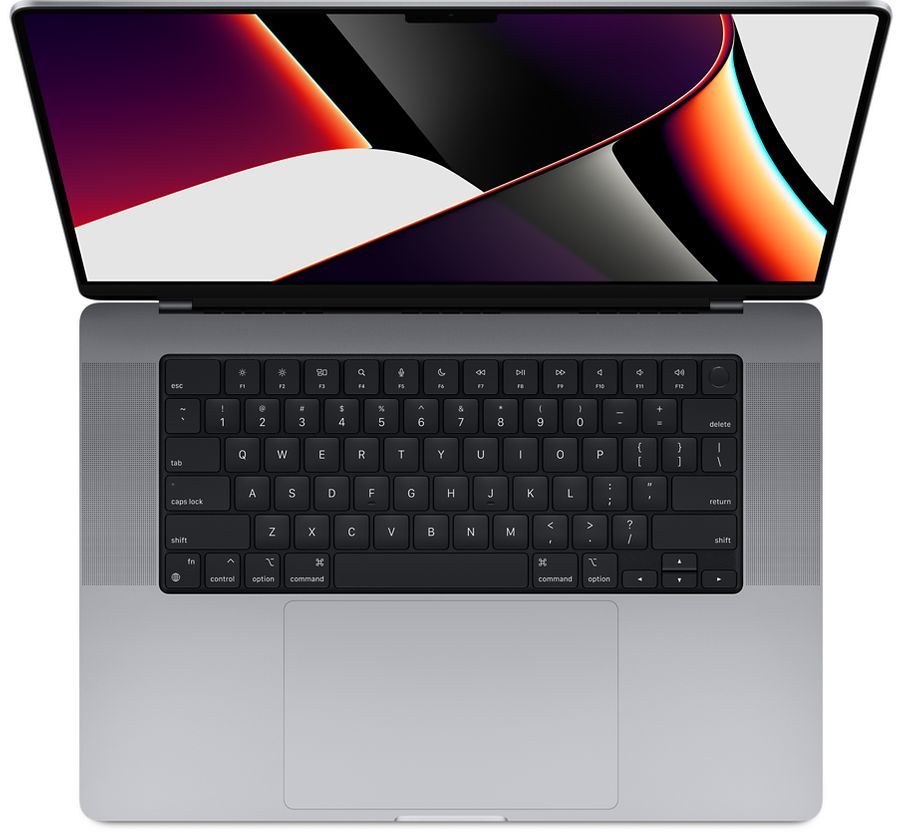
The MacBook Pro sits at the top of the lineup, targeting professionals who need maximum performance, advanced display technology, and extensive connectivity.
Display Excellence
One of its standout features is the mini-LED ProMotion display:
- 120Hz refresh rate for smooth visuals
- Up to 1600 nits brightness (HDR)
- Exceptional contrast and color accuracy
Users can also opt for a nano-texture display upgrade, which significantly reduces glare—especially useful for outdoor or studio work.
Performance Capabilities
The MacBook Pro lineup supports:
- M5 (base model)
- M5 Pro
- M5 Max
These chips deliver massive improvements in CPU and GPU performance, making the Pro ideal for:
- 4K and 8K video editing
- 3D rendering and animation
- Software development at scale
- Running AI models and local LLMs
Connectivity and Ports
Unlike the Neo and Air, the Pro includes professional-grade ports:
- HDMI 2.1
- SD card reader
- Thunderbolt ports
- MagSafe charging
This eliminates the need for external dongles in many workflows.
Best Configuration Recommendation
The 14-inch MacBook Pro with M5 Pro chip is considered the sweet spot. It balances performance, portability, and cost effectively, especially when paired with the nano-texture display upgrade.
Who Should Buy It?
The MacBook Pro is ideal for:
- Video editors and designers
- Software engineers working on heavy projects
- AI/ML developers
- Creative professionals
If performance is your top priority, this is the machine to get.
Should You Buy a MacBook in 2026?
Yes—2026 is one of the best times to buy a MacBook. Apple has already refreshed its lineup, and no major upgrades (like M6 chips or new models) are expected until 2027. This means you’re getting current-generation hardware that will remain relevant for years.
Useful macOS Tips for New Users
To enhance your experience, consider these simple tweaks:
- Auto-hide Dock: Enable auto-hide to maximize screen space
- Tap to Click: Turn this on for a smoother trackpad experience
- Video Call Lighting: Use the built-in edge lighting feature to improve your appearance in meetings
Final Verdict
Choosing between the MacBook Neo, Air, and Pro comes down to your specific needs:
- Go for Neo if you want affordability and basic performance
- Choose Air if you need a balance of power and portability
- Pick Pro if you require top-tier performance and professional tools
Each model serves a clear purpose, and Apple’s 2026 lineup ensures there’s a MacBook for every type of user.
Related Articles

Cosmic Byte Drakon Review – The Ultimate Tri-Mode Gaming Controller Under ₹5,000?
Discover the Cosmic Byte Drakon gaming controller with tri-mode connectivity, TMR joysticks, mechanical buttons, and pro-level customization. Full review, features, and performance breakdown.

Govt Unveils New Housing Loan Plan to Own a House for Just Rs. 16,500 Per Month
Govt Unveils New Housing Loan Plan to Own a House for Just Rs. 16,500 Per Month

FBR Increases PTA Tax on Imported Used Smartphones in Pakistan – Full Breakdown 2026
FBR PTA Tax Increase 2026: New Duties on iPhone, Samsung, Pixel & OnePlus